My First NPM Package: github-traffic-cli

Search for a command to run...

No comments yet. Be the first to comment.
I'm a big fan of a table of contents (ToC) on the side of a blog post page, especially if it is a long article. It helps me gauge the article's length and allows me to navigate between the sections quickly. In this article, I will show you how to cre...

This year I launched a free eBook with 27 helpful tips for Vue developers for subscribers of my weekly Vue newsletter. For marketing purposes, I showed a popup on the landing page of my portfolio page each time a user visited my site. I was aware tha...

My portfolio website is built with Nuxt 3 and Nuxt Content v2. An RSS feed with my latest five blog posts is available here. In this article, you'll learn how to add an RSS feed to your Nuxt website. Setup First, let's create a new Nuxt 3 project. As...

title: How to Create a Custom Code Block With Nuxt Content v2 published: true date: tags: nuxt, vue, nuxtjs, vuejs, webdev canonical_url: https://www.mokkapps.de/blog/how-to-create-a-custom-code-block-with-nuxt-content-v2/ cover_image: https://dev-t...

Code blocks are essential for blogs about software development. In this article, I want to show you how can define a custom code block component in Nuxt Content v2 with the following features: Custom styling for code blocks inside Markdown files Sho...

Since I published my first projects on GitHub I really enjoyed viewing the traffic on my repositories. It is really interesting to see how many people visit or clone my repositories.
Unfortunately it costs a lot of time to click through all available repositories and I was looking for a more elegant way.
I stumbled upon the npm package github-traffic which already provides an API to fetch the GitHub traffic. So I decided to write a command line interface (CLI) npm package which uses this API.
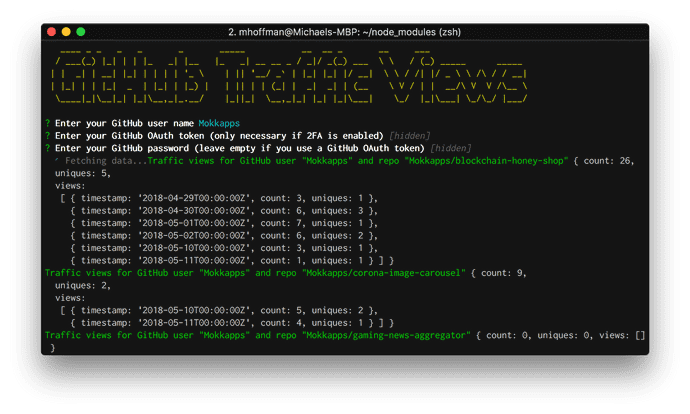
As a result I can check the traffic on all of my repositories with one CLI command:
The process is very easy and documented in the npm docs.
chalk: Terminal string styling done right
clui: Node.js toolkit for quickly building nice looking command line interfaces
commander: The complete solution for node.js command-line interfaces
figlet: Terminal ASCII art from text
inquirer: A collection of common interactive command line user interfaces.
Originally published at www.mokkapps.de.